OpenGL教程:12. 基于CPU计算高度图的生成地形算法

在OpenGL中如果要实现地形生成,那么就需要用高度图来生成地形。

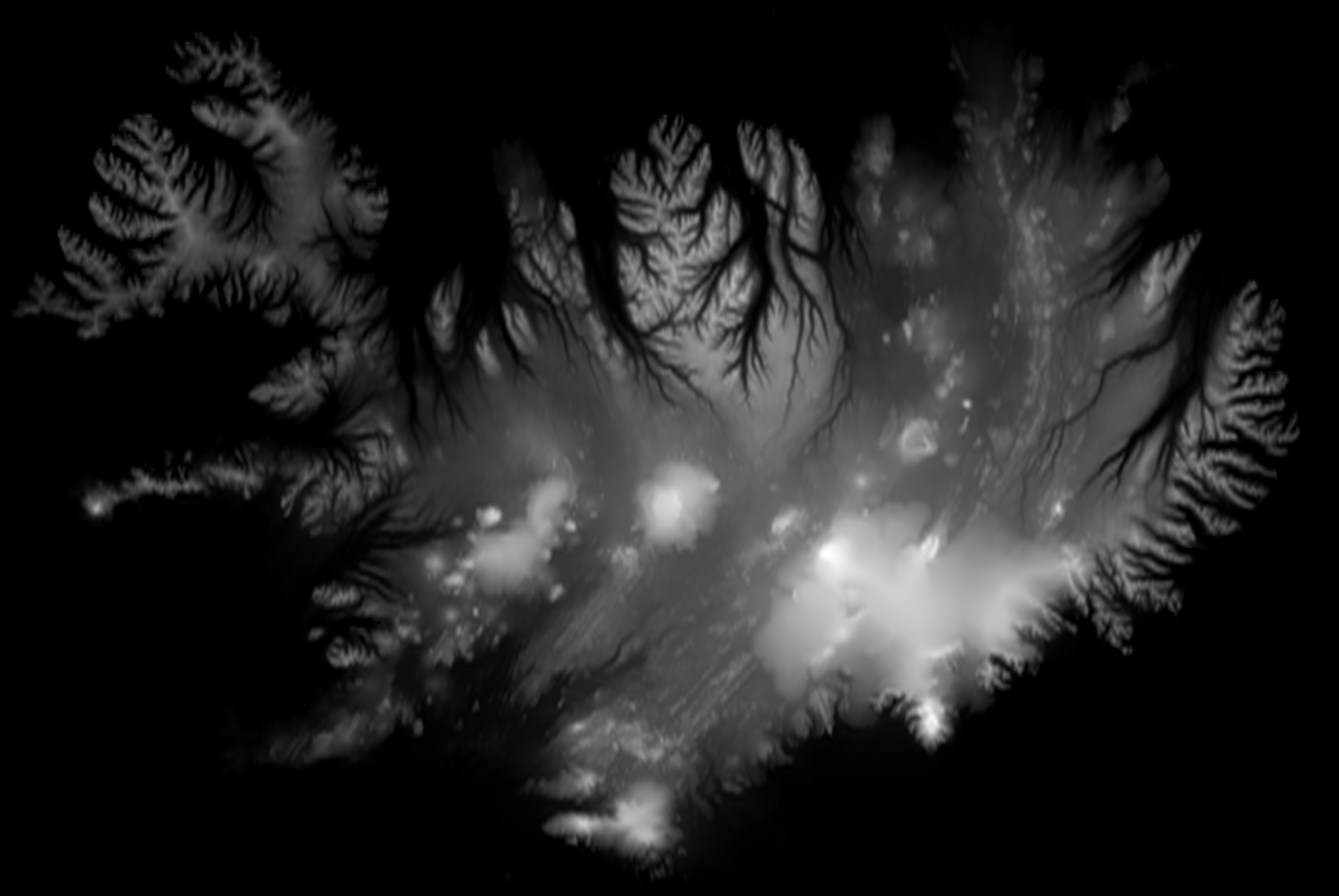
思路其实很简单,假如有如下高度图:

iceland_heightmap

可以理解为,越白海拔越高,越黑海拔越低。

我们用stb_image库来读取高度图:

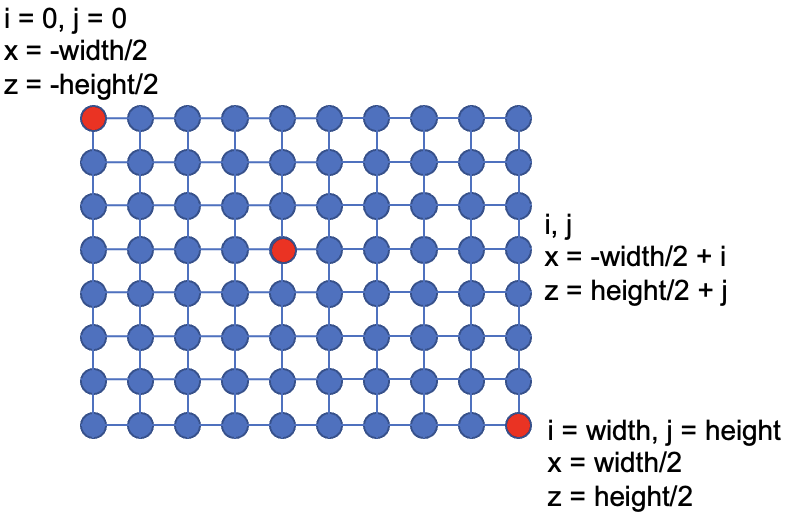
首先我们来了解高度图的结构:

Mesh Vertices

左上角为高度图的左上角,以此类推。

我们以高度图的中央作为坐标系的原点,左上角为-x,-z方向,右下角为x,z方向。高度图中每个元素的值就是海拔的值y。所以我们通过读取高度图的值,就能确定这个地形的所有信息。(这里建议大家先看看图片的数据结构,每个元素都是RGB或者RGBA的值)

1
2
3
4
5
6
7
8
9
10
11
12
13
14
15
16
17
18
19
20
unsigned char *data = stbi_load("textures/iceland_heightmap.png",
&width, &height, &nChannels,
0); //读取高度图
if(!data) {
std::cout << "Error!\n";
exit(0);
}

float yScale = 64.0f / 256.0f, yShift = 16.0f; // 设定y的缩放量(64/256倍,最高就是64了)和偏移量(这是为了将y设定的没那么高,以防过高,因为RGBA中的取值范围为0到255,很容易超出距离的)
for(unsigned int i = 0; i < height; i++) { //按行按列
for(unsigned int j = 0; j < width; j++) {
unsigned char *texel = data + (i * width + j) * nChannels; //乘以nChannels(4),因为RGBA通道是4个元素
unsigned char y = texel[0]; //取0~3都可以,因为高度图是灰度图,灰度图的RGBA值都一样的
//按照公式计算xyz
terrainVertices.push_back(-height/2.0f + i); //v.x
terrainVertices.push_back((int)y * yScale - yShift);//v.y
terrainVertices.push_back(-width/2.0f + j); //v.z
}
}
stbi_image_free(data);

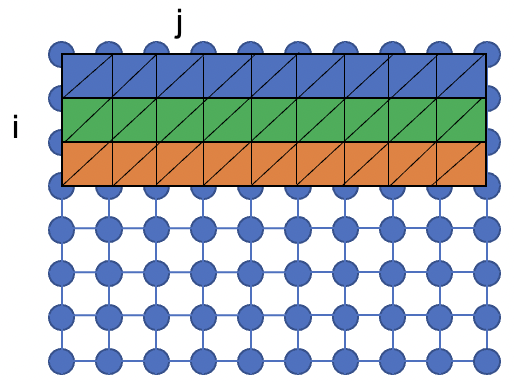
接下来确定切片,优化计算,方案还是根据高度图的结构来:

Mesh Triangle Strips

从高度图的结构可以知道,每个元素都是一个顶点,他们构成了众多三角面片,他们的顺序如下:

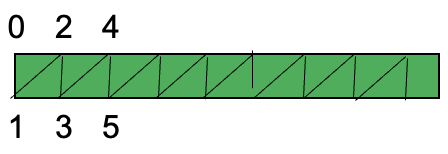
Mesh Triangle Strip Numbering

我们可以按照012345的顺序存储切片序列,这样012是一个三角形,345是一个三角形…推广至任意位置的:

Mesh Triangle Strip Generic Numbering

注意到我们没有渲染123,234的三角形,这是因为这样可以优化算法,避免多次计算。因为012和345可以合成一个矩形,在误差允许范围内这是可行的!

1
2
3
4
5
6
7
8
//  indices计算
for(unsigned int i = 0; i < height - 1; i++) {
for(unsigned int j = 0; j < width; j++) {
for(unsigned int k = 0; k < 2; k++) {
terrainIndices.push_back((i + k) * width + j);
}
}
}

最后我们交给VAO、VBO、EBO来传输数据到着色器:

1
2
3
4
5
6
7
8
9
10
11
12
13
14
15
16
17
18
19
glGenVertexArrays(1, &terrainVAO);
glBindVertexArray(terrainVAO);

glGenBuffers(1, &terrainVBO);
glBindBuffer(GL_ARRAY_BUFFER, terrainVBO);
glBufferData(GL_ARRAY_BUFFER,
terrainVertices.size() * sizeof(float),
&terrainVertices[0],
GL_STATIC_DRAW);
// position attribute
glVertexAttribPointer(0, 3, GL_FLOAT, GL_FALSE, 3 * sizeof(float), (void*)(nullptr));
glEnableVertexAttribArray(0);

glGenBuffers(1, &terrainEBO);
glBindBuffer(GL_ELEMENT_ARRAY_BUFFER, terrainEBO);
glBufferData(GL_ELEMENT_ARRAY_BUFFER,
terrainIndices.size() * sizeof(unsigned int),
&terrainIndices[0],
GL_STATIC_DRAW);

这样渲染数据:

1
2
3
4
5
6
7
8
9
10
11
// 绘制网格
glBindVertexArray(terrainVAO);
for(unsigned int strip = 0; strip < height - 1; ++strip)
{
glDrawElements(GL_TRIANGLE_STRIP,
(width * 2), // indices的数量
GL_UNSIGNED_INT,
(void*)(sizeof(unsigned int)
* (width * 2)
* strip));
}

着色器如下:

1
2
3
4
5
6
7
8
9
10
11
12
13
14
15
//vsh
#version 330 core
layout (location = 0) in vec3 aPos;

out float Height;
//out vec3 position;

uniform mat4 model;
uniform mat4 view;
uniform mat4 projection;

void main(){
Height = aPos.y;
gl_Position = projection * view * model * vec4(aPos, 1.0);
}
1
2
3
4
5
6
7
8
9
10
//fsh
#version 330 core
in float Height;

out vec4 FragColor;

void main(){
float h = (Height + 16)/32.0f; //将高度转换为0~1范围
FragColor = vec4(h, h, h, 1.0f);
}

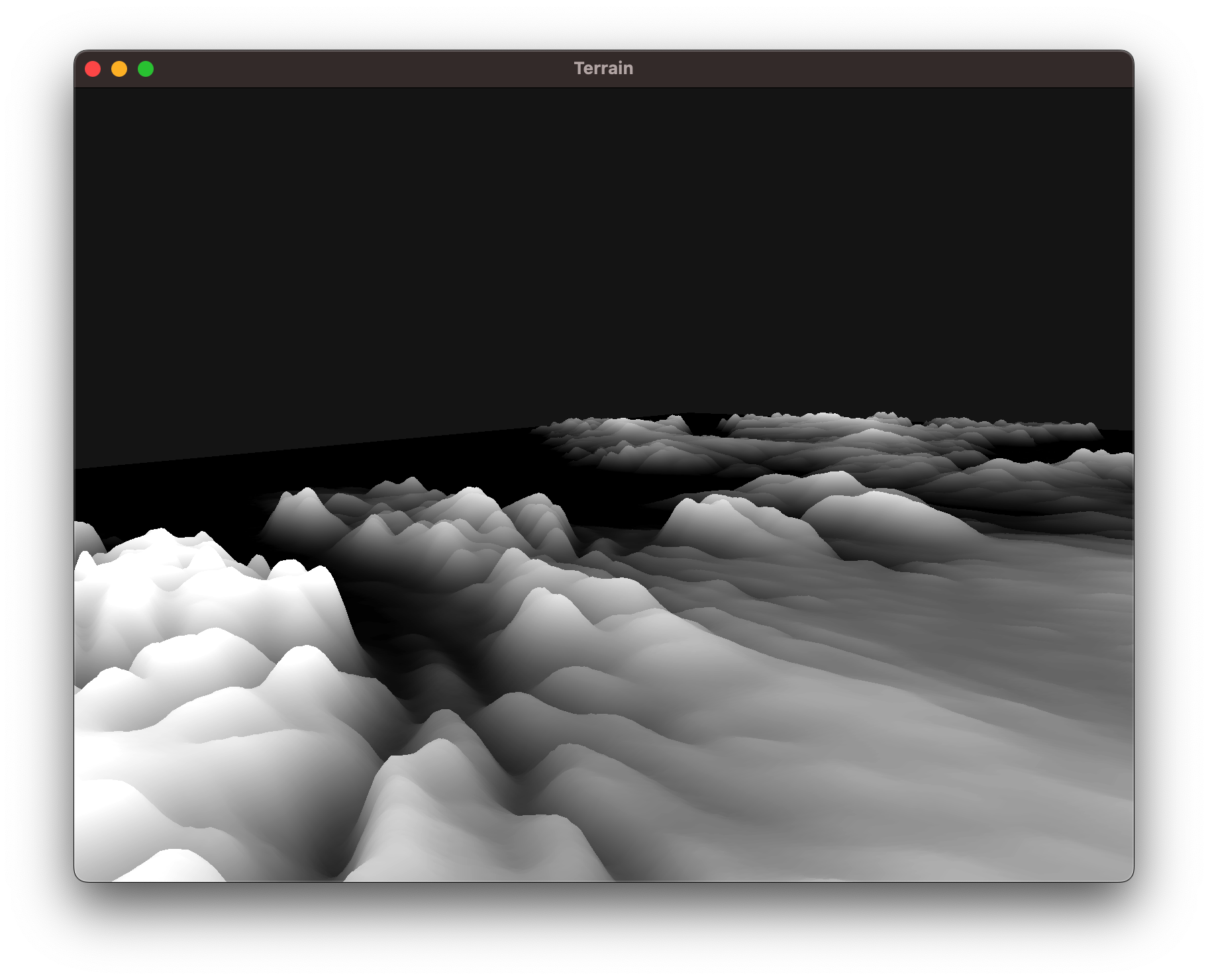
效果如图:

image-20221116010632315

时间复杂度分析:

总而言之,读取图片需要用到$O(n^2)$,并且很耗费内存。在之后我们会抛弃这种在CPU的行为,我们会用着色器的技术,在GPU进行渲染,那种方法效率更高!

为高度图上色

其实思路很简单,就是需要Diffuse Map而已!所以只需要修改两个函数:

1
2
3
4
5
6
7
8
9
10
11
12
13
14
15
16
17
18
19
20
21
22
23
24
25
26
27
28
29
30
31
32
33
34
35
36
37
38
39
40
41
42
43
44
45
46
47
48
49
50
51
52
53
54
55
56
57
58
59
60
61
62
63
64
65
66
67
68
69
void loadHeightMap() {
unsigned char *data = stbi_load("textures/Height-Map.png",
&width, &height, &nChannels,
0);
int dwidth, dheight, dn;
unsigned char *diffuse = stbi_load("textures/Diffuse-Map.png",
&dwidth, &dheight, &dn,
0);
if (!data || !diffuse) {
std::cout << "Error: Load HeightMap or DiffuseMap Failed! \n";
exit(0);
}
float yScale = 64.0f / 256.0f, yShift = 16.0f;
for (unsigned int i = 0; i < height; i++) {
for (unsigned int j = 0; j < width; j++) {
unsigned char *texel = data + (i * width + j) * nChannels;
unsigned char *color = diffuse + (i * width + j) * dn;

unsigned char y = texel[0];
terrainVertices.push_back(-height / 2.0f + i);
terrainVertices.push_back((int) y * yScale - yShift);
terrainVertices.push_back(-width / 2.0f + j);

terrainTexture.push_back((float)color[0]/255.0f);
terrainTexture.push_back((float)color[1]/255.0f);
terrainTexture.push_back((float)color[2]/255.0f);
}
}

stbi_image_free(data);

// indices计算
for (unsigned int i = 0; i < height - 1; i++)
for (unsigned int j = 0; j < width; j++)
for (unsigned int k = 0; k < 2; k++)
terrainIndices.push_back((i + k) * width + j);
}

void initTerrain() {
glGenVertexArrays(1, &terrainVAO);
glBindVertexArray(terrainVAO);

glGenBuffers(1, &terrainVerticesVBO);
glBindBuffer(GL_ARRAY_BUFFER, terrainVerticesVBO);
glBufferData(GL_ARRAY_BUFFER,
terrainVertices.size() * sizeof(float),
&terrainVertices[0],
GL_STATIC_DRAW);
// position attribute
glVertexAttribPointer(0, 3, GL_FLOAT, GL_FALSE, 3 * sizeof(float), (void *) (nullptr));
glEnableVertexAttribArray(0);

glGenBuffers(1, &terrainTextureVBO);
glBindBuffer(GL_ARRAY_BUFFER, terrainTextureVBO);
glBufferData(GL_ARRAY_BUFFER,
terrainTexture.size() * sizeof(float),
&terrainTexture[0],
GL_STATIC_DRAW);
GLuint terrainTextureLocation = glGetAttribLocation(terrainShader->id, "color");
glEnableVertexAttribArray(terrainTextureLocation);
glVertexAttribPointer(terrainTextureLocation, 3, GL_FLOAT, GL_FALSE, 3 * sizeof(float), (void*) (nullptr));

glGenBuffers(1, &terrainEBO);
glBindBuffer(GL_ELEMENT_ARRAY_BUFFER, terrainEBO);
glBufferData(GL_ELEMENT_ARRAY_BUFFER,
terrainIndices.size() * sizeof(unsigned int),
&terrainIndices[0],
GL_STATIC_DRAW);
}
Author

InverseDa

Posted on

2022-11-11

Updated on

2023-03-30

Licensed under

Comments

Your browser is out-of-date!

Update your browser to view this website correctly.&npsb;Update my browser now

×